
Prompts & plugins
CC Switch
The unified control plane for configuring and routing over a dozen AI coding ass
What is CC Switch?
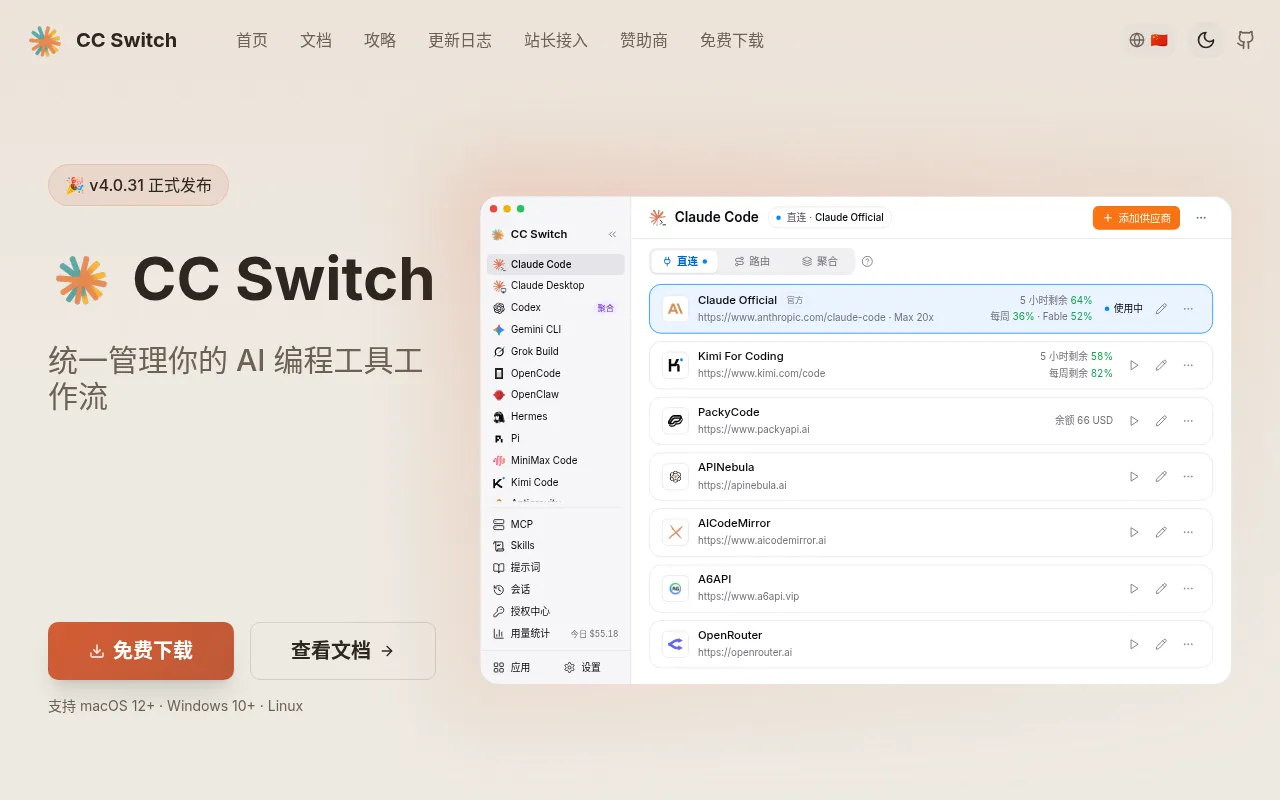
CC Switch is a unified management platform designed specifically for developers navigating the expanding ecosystem of AI coding assistants.As tools like Claude Code, Claude Desktop, Codex, Gemini CLI, and Grok Build become essential to daily workflows, managing their disparate configurations and local environments can become cumbersome.CC Switch addresses this by providing a centralized console for handling vendor configurations and local routing across these diverse tools.
Beyond basic configuration, the platform deeply integrates support for the Model Context Protocol (MCP), reusable Skills, session management, and usage statistics.It allows users to seamlessly manage a wide array of agents including OpenCode, OpenClaw, Hermes Agent, Pi, MiniMax Code, Kimi Code, Antigravity, and Oh My Pi, ensuring a streamlined and efficient development experience regardless of the underlying AI provider.
Key features
- Broad Tool SuppoNatively supports over a dozen AI coding tools including Claude Code, Claude Desktop, Codex, Gemini CLI, Grok Build, OpenCode, OpenClaw, Hermes Agent, Pi, MiniMax Code, Kimi Code, Antigravity, and Oh My Pi.
- Unified ConfigurCentrally manage vendor API keys, model parameters, and environment variables for all connected tools in a single interface, eliminating the need to switch between disparate config files.
- Smart Local RoutConfigure flexible local routing rules to automatically direct requests to the most suitable AI agent or model backend based on task type or user preference.
- MCP & Skills IntDeeply integrates with the Model Context Protocol (MCP) and reusable Skills modules to extend the capabilities of AI assistants and enable complex context interactions.
- Session & UsageTrack session history and resource consumption across all tools in real-time, helping individuals and teams optimize costs and analyze usage efficiency.
How to use it
- Visit the official CC Switch website to download the latest installer or access documentation.
- Initialize CC Switch in your local environment and connect the AI coding tools you wish to manage, such as Claude Code or Gemini CLI.
- Enter vendor API keys and necessary runtime parameters for each tool in the unified configuration panel.
- Configure local routing rules and MCP server connections to define default behaviors and skill extensions for different tasks.
- Start your daily development workflow, monitoring session status and usage statistics via CC Switch to adjust configurations as needed.
Where it fits
- Multi-Model DeveDevelopers quickly switch between code generation capabilities of Claude, Gemini, and Kimi within the same project, reducing environment setup time through unified routing.
- Enterprise AI GoTechnical teams centrally manage member permissions and usage of AI tools to ensure compliance with security policies and control API spending.
- Complex Agent WoBuild automated coding pipelines where multiple AI agents, such as Hermes Agent and OpenClaw, collaborate using MCP and Skills functionalities.
Pricing and free quota
Pricing and any free quota follow the official site.
Who it is for
- Full-stack Software Engineers
- AI Application Developers
- Technical Team Leads
- DevOps Engineers
FAQ
Which major AI coding tools does CC Switch support?
It supports a wide range of tools including Claude Code, Claude Desktop, Codex, Gemini CLI, Grok Build, OpenCode, OpenClaw, Hermes Agent, Pi, MiniMax Code, Kimi Code, Antigravity, and Oh My Pi.
Can I manage MCP servers through CC Switch?
Yes, CC Switch provides unified management support for the Model Context Protocol (MCP), making it easier to integrate and call various context services.
Does CC Switch offer usage statistics?
Yes, the platform includes session management and usage statistics features to help you track resource consumption across different tools.