
AI writing
爱改写
Operated by Wuxi Huizhi Data Technology Co., Ltd., Ai Gaixie (aigaixie.com) is an intelligent writing assistant dedicated to reducing AI detection rates and false positives.
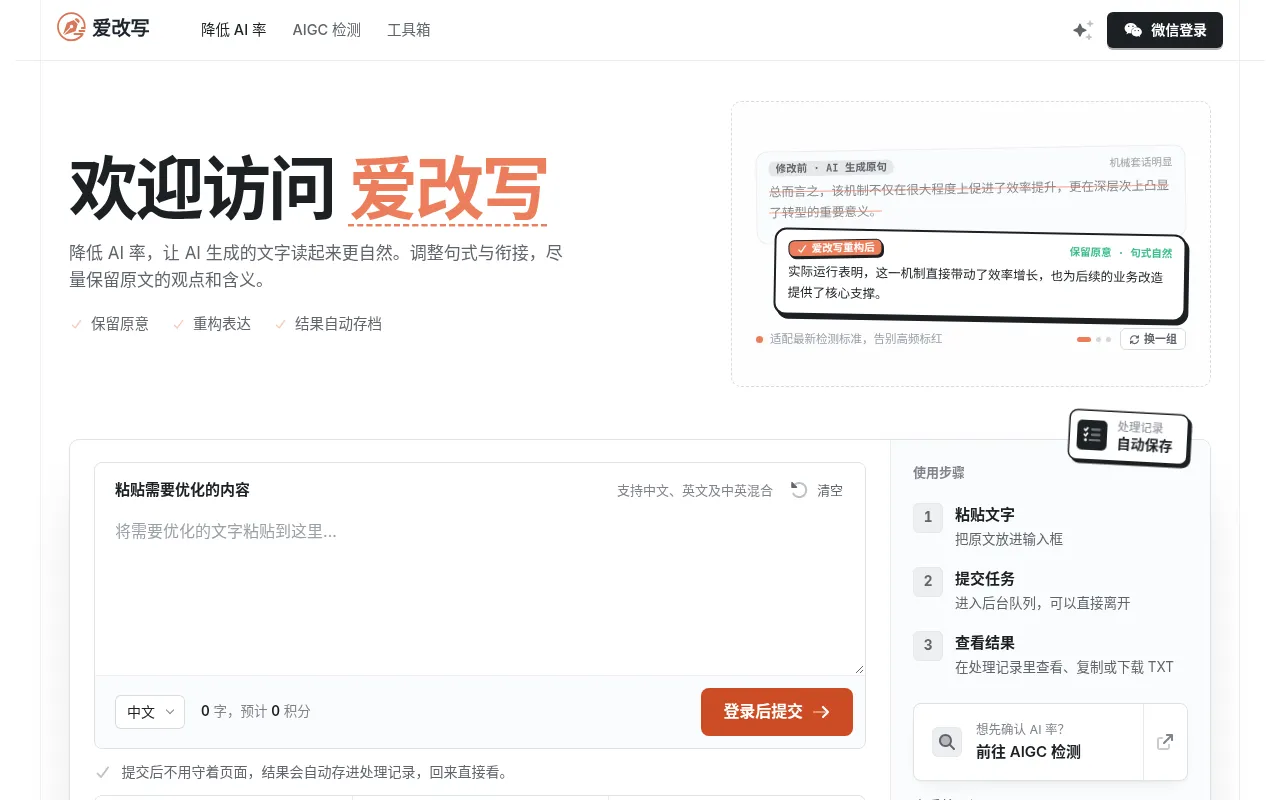
What is 爱改写?
Operated by Wuxi Huizhi Data Technology Co., Ltd., Ai Gaixie (aigaixie.com) is an intelligent writing assistant dedicated to reducing AI detection rates and false positives.Rather than simply swapping synonyms, it employs core algorithms to multi-layer optimize text structure and expression, addressing common issues in AI-generated content such as mechanical clichés, vague qualifiers, and templated openings to make text read more naturally and like human writing.
The tool supports Chinese, English, Japanese, Korean, and mixed Chinese-English texts.Once submitted, tasks are processed automatically in a background queue involving semantic understanding, feature analysis, expression restructuring, and consistency checks, with results saved to your history so you don't need to keep the page open.Ai Gaixie commits to strictly preserving original viewpoints, key data, professional terminology, and citations, ensuring facts remain accurate.
Key features
- Deep Semantic ReGoes beyond simple synonym swapping by identifying themes and scenarios, adjusting sentence structure, cohesion, and rhythm to replace clichés with concrete expressions.
- Meaning & Data PStrictly preserves original viewpoints, key information, factual data, and professional terminology, using consistency checks to ensure content accuracy.
- Background QueueSubmit tasks and leave the page; the system processes them in a background queue and automatically saves results to your 'Usage History'.
- Multi-Language SSupports optimization for Chinese, English, Japanese, Korean, and mixed Chinese-English texts, adapting to different linguistic habits.
- AIGC Detection AOptimized for mainstream detection standards, focusing on eliminating high-risk markers like templated openings and vague qualifiers.
- Privacy & SecuriText is used only for processing and viewing your records, not for unrelated model training; records are saved for 30 days by default and can be physically deleted at any time.
How to use it
- Register or Log In: Log in via WeChat scan; new users receive 10 credits upon registration.
- Paste Text: Insert the original text into the input box and select the corresponding language (e.g., Chinese, English, or mixed).
- Submit Task: Click submit to send the task to the background queue; you can close the page or do other things while it processes.
- View Results: Return to the 'Processing Records' page later to view, copy, or download the results in TXT format.
- Optional Pre-check: Use the free pre-check (first 200 characters) to mark common templated expressions before full processing if desired.
Where it fits
- Academic & PaperOptimize AI-assisted paper paragraphs while preserving technical terms, data, and citations, reducing the risk of plagiarism and AIGC detection.
- Social Media ConTransform AI-generated drafts into more natural, personalized copy that avoids mechanical clichés and improves reader engagement.
- Business ReportQuickly restructure AI-drafted business analysis reports to ensure an objective, natural tone while strictly retaining key business data and conclusions.
Pricing and free quota
Pricing and any free quota follow the official site.
Who it is for
- Content creators needing to lower AIGC detection rates
- Students and researchers looking to polish AI-first drafts
- Corporate copywriters and editors seeking natural expression
FAQ
Will it change my original meaning, data, or terminology?
No.Ai Gaixie promises not to alter your viewpoints, data, professional terms, or citations.You can compare with the original after processing and keep original paragraphs if unsatisfied.
Can you guarantee a specific AIGC detection score?
We cannot promise a fixed number.Algorithms and standards vary across detection platforms, so results may differ.We recommend testing before and after processing to judge the actual outcome.
How long does it take to see results?
Tasks queue before deep processing.Typically, results appear in about 30 seconds depending on length; you can leave the page after submission, and results will be saved in 'Usage History'.
How long are my records kept?How do I delete them?
Original texts and results are saved for 30 days by default.You can delete items individually or in bulk from 'Usage History'; once deleted, they are physically removed from the server and cannot be recovered.