Guide
88Z desktop client: install, sign in, top up and switch models
A step-by-step guide to installing the 88Z client, signing in, topping up and switching models. Windows and Linux are available; macOS is coming. The app is free; chats are billed in points.

The 88Z desktop client is a Windows and Linux app for chatting with models on this site. You sign in with your 88Z account — no API key, no base URL. This page walks through install, sign-in, top-up and model switching. Current version: v1.0.0, dated 2026-11-27 on the client download page.
If you mainly want to know whether this is a way to use ChatGPT, Claude or Gemini from China, start with using ChatGPT, Claude and Gemini from China without an API key. If you are choosing among the client, the website and Cherry Studio, see client vs web workspace vs Cherry Studio.
1. Download the right build
Use the client download page only.
- Windows 10 or 11, 64-bit (x64): 88Z-Setup-1.0.0-x64.exe, about 109.3 MB. You can choose the install folder and add a desktop shortcut.
- Linux: 88Z-1.0.0-x86_64.AppImage, an x86_64 AppImage, about 119.7 MB. After download, run
chmod +x 88Z-1.0.0-x86_64.AppImage, then double-click it or open it in a terminal. AppImage usually needs FUSE. Ubuntu 20.04, Debian 11 or newer is recommended. - macOS: coming soon. Use the web workspace until it ships; the account and balance are the same.
- System needs: about 4 GB of memory, about 400 MB of free disk, and a network that can reach 88z.ai. The app has to be online to chat.
Each file on the download page has a SHA-256. On Windows: Get-FileHash .\88Z-Setup-1.0.0-x64.exe. On Linux: sha256sum 88Z-1.0.0-x86_64.AppImage. The result must match the page.
Version 1.0 is not code-signed. Windows SmartScreen may say it protected your PC. After the source and the hash check out, choose “More info” → “Run anyway”.
2. Sign in
Open the app and click “Sign in with 88Z account”. A browser window asks you to confirm, then returns you to the client. If you do not have an account, you can register for free on the site.
You should not be asked for an API key or a base URL. If a form asks for those, you are in the wrong app — quit and download again from 88z.ai.
3. Pick a model and send a short message
Models are grouped by vendor, including GPT, Claude, Gemini, DeepSeek and Qwen. You can search, favourite and set a default. The list matches the web workspace; the live catalogue is the model catalogue.
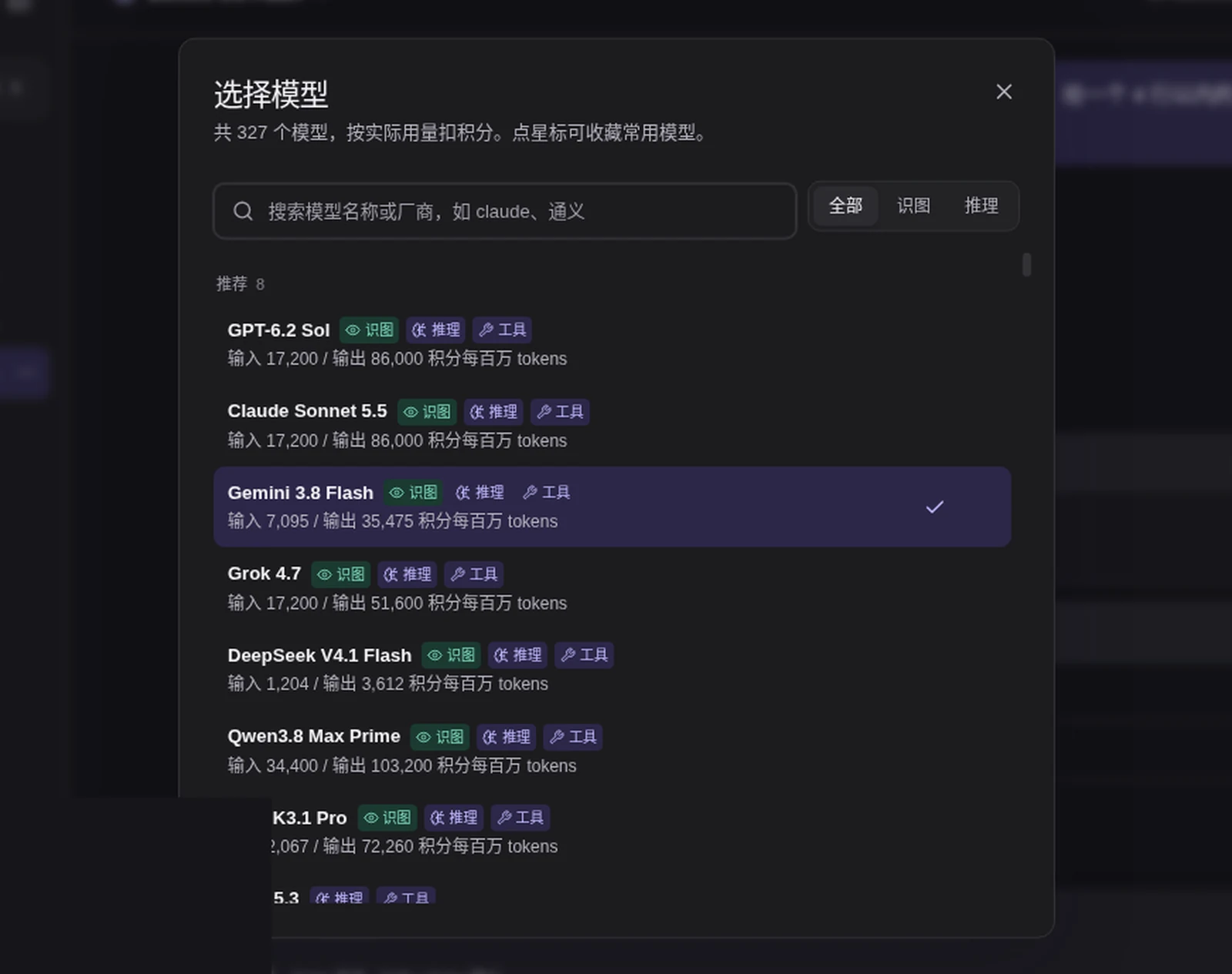
Send a short question first and look under the reply: you should see a token count and the points charged. That is the easiest way to understand billing before you run a long task. Models that accept images can read a dropped or pasted picture; you can attach a text file as well. Reasoning models can show their thinking. Code, tables and formulas render in the thread.
Chat history is stored on your computer. Use Settings → Data to export, import or clear it. Generating a reply still sends the conversation to 88Z’s service.
4. Top up when you need points
The client is free. Usage is billed in points: 1 CNY = 1,000 points, via Alipay, at the same rates as the website. Each reply shows what that turn cost.
When the balance is too low, click “Top up” at the bottom left, or open Settings → Account, choose an amount and pay with Alipay. The balance refreshes in the app. The website and the client share it — you do not top up twice.
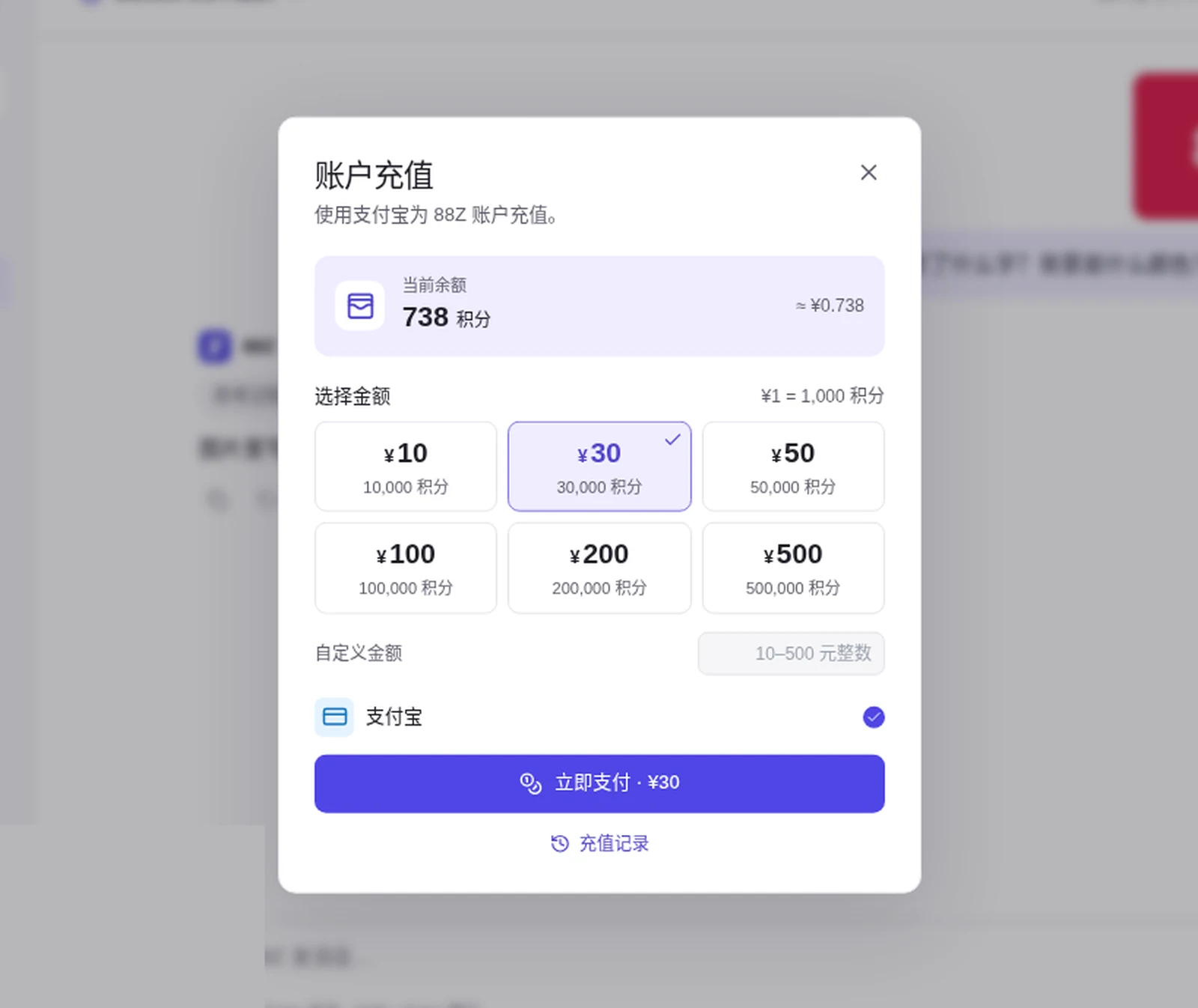
This article does not freeze unit prices. Use the pricing page and the calculator when you need a number.
After it works
- Set a default model you actually use.
- Turn on automatic updates, or check Settings → About when you want a new build.
- If you later connect Cursor, Claude Code or Cherry Studio, create a key in the workspace and keep using the same balance. Setup notes: guides.
Questions: 888v@88.com.
Sources
Checked on 2026-11-27 against the client download page (v1.0.0) and the pricing page.
FAQ
Where should I download the installer?
Only from the official download page on 88z.ai. Compare the SHA-256 on that page with the file you saved.
Windows says it protected my PC. Is the file unsafe?
Version 1.0 is not code-signed yet, so SmartScreen often shows this warning for a new app. After you confirm the file came from 88z.ai and the hash matches, choose “More info”, then “Run anyway”.
Where is chat history stored?
On your computer. You can export, import or clear it in Settings → Data. Generating a reply still sends the conversation to 88Z’s service to process.
How do I update?
Windows and Linux check for updates when the app starts, then ask you to restart. You can also check in Settings → About.