
Prompts & plugins
PromptFolder
PromptFolder offers a free Midjourney Prompt Generator designed to help users easily create powerful image generation instructions.
What is PromptFolder?
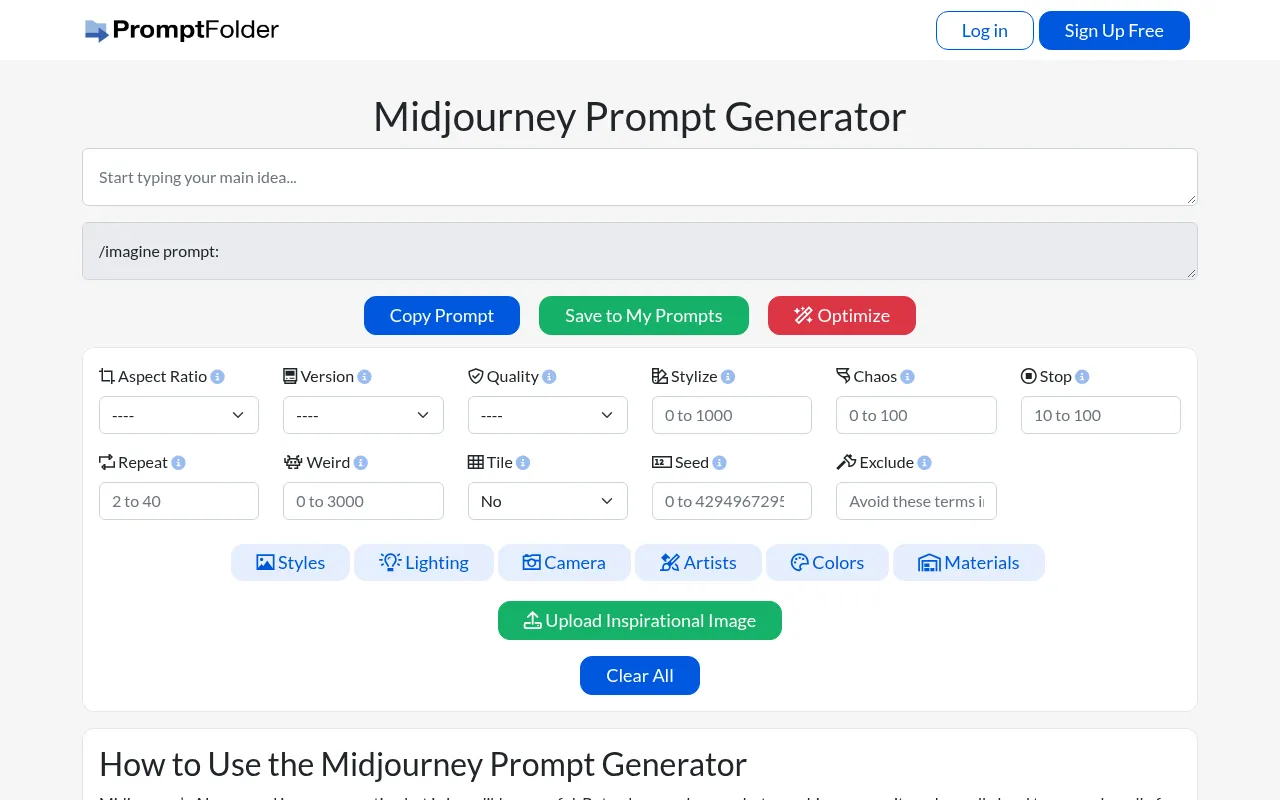
PromptFolder offers a free Midjourney Prompt Generator designed to help users easily create powerful image generation instructions.Facing the numerous parameters and styling options supported by the Midjourney bot, users often struggle to remember every detail, and this tool addresses that pain point with an intuitive interface.
Users simply input their core concept and can quickly adjust key parameters such as aspect ratio, version, quality, and stylize levels via dropdown menus and presets.The tool also supports uploading inspirational images, applying artist style presets, and adjusting lighting and materials, ultimately generating an optimized prompt ready for one-click copying.
Beyond immediate generation, PromptFolder allows users to save their finely tuned prompts to their personal accounts for future reference and reuse.Whether you are a beginner or a seasoned pro, this tool enables more efficient exploration of the infinite possibilities of AI art.
Key features
- Visual ParameterEasily set aspect ratios, Midjourney versions (e.g., v6, v5.2), quality, chaos, stop parameters, and more via a graphical interface without memorizing complex codes.
- Rich Style PreseIncludes extensive style options such as artists (e.g., Van Gogh, Da Vinci), lighting types (e.g., neon, natural light), materials, colors, and camera lens effects.
- Prompt WeightingSupports weighting different parts of your prompt, allowing the AI to strongly or lightly focus on specific elements for precise control over the output.
- Inspirational ImAllows users to upload reference images to combine with text descriptions, creating more targeted image prompts for image-to-image or style transfer effects.
- Cloud Save & ManRegistered users can save frequently used prompts to their 'My Prompts' library, supporting folder categorization for easy access anytime.
- One-Click CopyOnce generated, click the copy button to copy the complete /imagine command to your clipboard, ready to paste directly into Discord.
How to use it
- Visit the PromptFolder website and log in or sign up for a free account.
- Enter the core concept or description of the image you want to generate in the input box.
- Use the options below to set parameters such as aspect ratio, Midjourney version, stylize level, and chaos value.
- Browse and select preferred artist styles, lighting effects, materials, or color presets, and optionally upload a reference image.
- Review the generated prompt preview and click 'Copy Prompt' to copy it to your clipboard.
- Click 'Save to My Prompts' to save the current configuration to your account for future use.
Where it fits
- AI Art CreationHelps digital artists quickly experiment with different style and parameter combinations, sparking creativity and improving generation efficiency.
- Marketing AssetMarketers can quickly generate poster backgrounds or product concept images that match brand tones using preset commercial styles and quality parameters.
- Prompt LearningBeginners can learn Midjourney's command structure through visual parameter selection and build their own library of high-quality prompts.
Pricing and free quota
Pricing and any free quota follow the official site.
Who it is for
- Midjourney Users
- Digital Artists
- Content Creators
- AI Art Enthusiasts
FAQ
Is PromptFolder free to use?
The basic prompt generation features are free, and users can register an account to save prompts.Please refer to the official website for specific pricing on advanced features.
Can I use the generated prompts directly in Midjourney?
Yes, the generated prompts are fully compatible with Midjourney.Simply copy them and paste them into the Midjourney bot channel on Discord.
How many prompts can I save?
Registered users can save prompts to their personal accounts.Please check the official website for the latest information on storage limits or membership benefits.
Which Midjourney versions are supported?
The tool supports selecting various Midjourney versions, including v6, v5.2, v5.1, v5, v4, v3, v2, v1, and the niji mode.