
AI office
auxi
auxi is an AI-powered PowerPoint add-in built specifically for consulting firms, banks, and capital markets.
What is auxi?
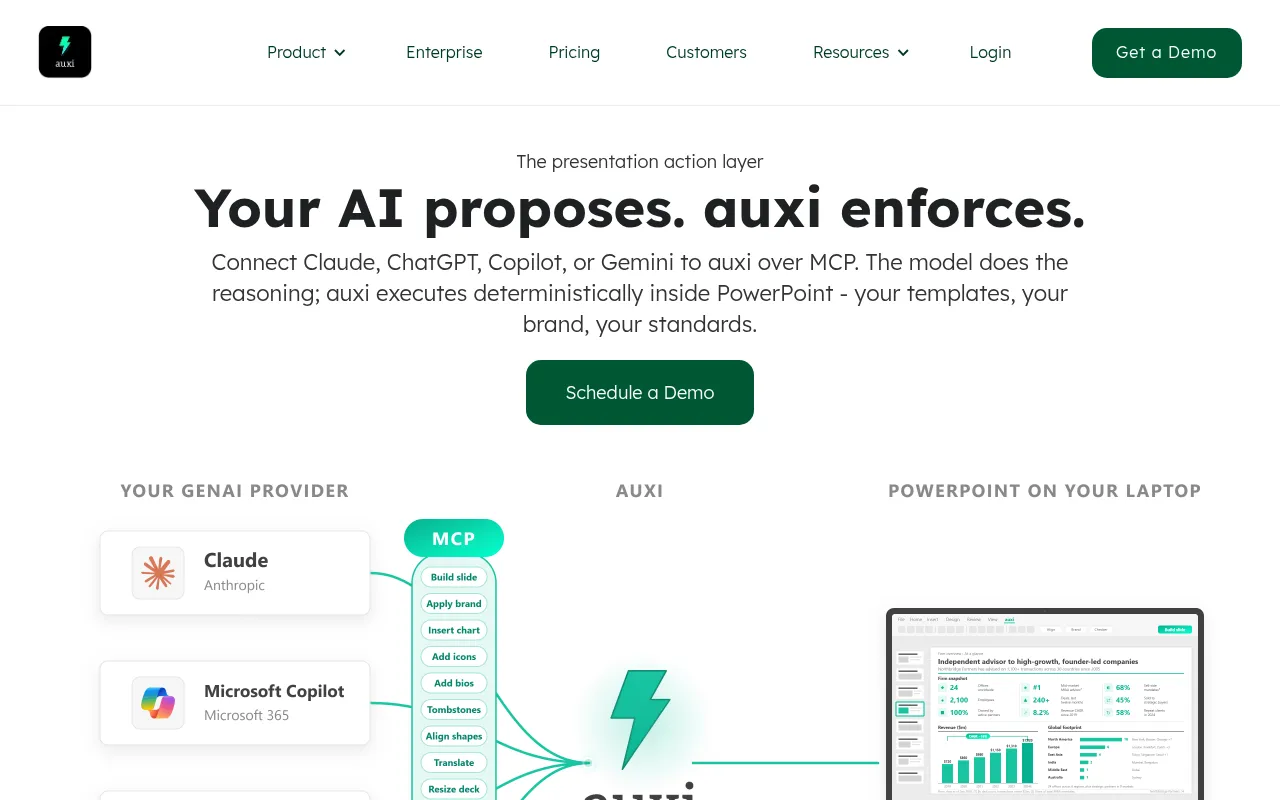
auxi is an AI-powered PowerPoint add-in built specifically for consulting firms, banks, and capital markets.It addresses the gap where Large Language Models (LLMs) excel at generating content but struggle with brand consistency.By connecting auxi as an 'execution layer' to models like Claude, ChatGPT, Copilot, or Gemini via MCP, users let the AI handle reasoning and drafting, while auxi deterministically formats the output into client-ready slides that strictly adhere to corporate templates, fonts, colors, and layout standards.
The platform enables brand automation with zero extra token overhead.Whether generating proposals from RFPs or creating full reports from prompts, auxi ensures every detail—from chart design and placeholder alignment to footnotes and disclaimers—complies with hundreds of brand rules.This allows teams to transform days of slide-building work into minutes of strategic review.
Key features
- MCP Execution LaConnects to leading LLMs like Claude via Model Context Protocol, letting the model handle reasoning while auxi precisely executes formatting and brand rules within PowerPoint.
- Brand ComplianceAutomatically applies hundreds of brand rules, including font sizes, brand colors, logo placement, margins, chart styles, and footnote formats, ensuring 100% brand consistency.
- Smart Proposal MConverts RFPs, past cases, or PDFs into structured, editable slides, automatically reusing approved pricing and credential pages to generate client proposals quickly.
- Checker QualityAutomatically scans entire presentations before delivery to check for text overflow, double spaces, empty placeholders, and alignment errors, ensuring flawless output.
- Darwin Deep ReseAdvanced agent capabilities for automated deck building, deep research, and super search, with all content strictly adhering to brand guidelines.
- SmartBar ProductProvides shortcuts for smart alignment, smart selection, AI editing, and agenda creation to enhance daily slide-making efficiency.
How to use it
- 1.Install the auxi PowerPoint add-in and log in to your enterprise account.
- 2.Connect your preferred LLM (such as Claude, ChatGPT, or Copilot) via MCP.
- 3.Enter a prompt or upload source documents (like RFPs or PDFs) to let the model generate content drafts and storylines.
- 4.auxi receives the draft and automatically builds slides based on predefined corporate templates and brand rules.
- 5.Use the Checker feature to review the final document for formatting errors before exporting or presenting.
Where it fits
- Rapid ConsultingRespond to urgent RFP requests by using auxi to quickly transform past cases and client needs into structured, brand-consistent proposal drafts.
- Investment BankiAutomatically generate periodic market analysis reports that meet strict banking format requirements, based on the latest market data and analyst notes.
- Brand StandardizWhen corporate brand guidelines update, use auxi to batch check and correct historical slide libraries, ensuring all external materials meet new standards.
Pricing and free quota
Pricing and any free quota follow the official site.
Who it is for
- Management Consulting Consultants
- Investment Banking Analysts
- Corporate Strategy Departments
- Teams requiring high-frequency professional presentation creation
FAQ
Which large language models does auxi support?
auxi supports connecting to mainstream models like Claude, ChatGPT, Copilot, and Gemini via MCP, allowing you to continue using your preferred AI assistant for content creation.
Does using auxi incur extra token costs?
No.auxi executes brand and formatting rules within the local PowerPoint environment without consuming LLM tokens, significantly reducing overall AI usage costs.
How does auxi ensure data security?
auxi is GDPR compliant and SOC 2 certified, uses SECTIGO protection mechanisms, and undergoes regular audits by external firms like ASTRA to ensure enterprise data security and integrity.